Wrong packing items, rates, amounts, billing periods, or totals that disagree prevent the PDFs from being generated.
README
Hi, I'm Shaynah.
I'm an Atlanta-based automation developer who builds Python tools and workflow systems for repetitive, error-prone business processes.
My background in game design shaped how I think about systems, logic, interaction, feedback, and edge cases. I bring that same mindset to automation: understanding how work actually happens, turning business rules into reliable workflows, and building tools people can confidently use.
Explore the desktop to see automation systems, interactive demos, and a few things I built because I thought they'd be fun. Tap around to see automation systems, interactive demos, and a few things I built because I thought they'd be fun.
Start here
Employer examples use recreated sample data to protect company and customer information.
Label Proof Automation System
The Workflow
Customers send requests for product labels through a shared inbox. Each request includes the exact text they want printed on the label, usually inside an Excel, PDF, or Word (.docx) attachment. Before production can begin, that information has to be turned into a correctly formatted label proof and sent back for customer approval.
Before the Automation
Before I automated the workflow, someone had to open the attachment, manually transfer the requested text into BarTender, format the label, capture an image of the finished proof, draft the response email, and keep track of which requests had already been handled.
I first documented the process as a training guide after new employees struggled with the same workflow. Once the process was clearly mapped out, I realized most of the repetitive work could be automated.
The Problem
The process was repetitive, interrupted other work, and depended on manually transferring customer-provided text without changing it. A typo, missing line, altered lot number, or formatting mistake could create an incorrect proof that still looked finished enough to send.
How the Automation Works
- Watches the shared Outlook inbox through Microsoft Graph
- Detects new label requests and reads Excel, PDF, or Word (.docx) attachments
- Extracts the customer-provided label text
- Formats the text for the standard 3×2 label while preserving the original content
- Runs validation and safeguard checks before creating anything customer-facing
- Opens BarTender and generates the formatted label proof
- Captures the finished proof as an image
- Creates a draft reply in the shared mailbox with the proof included
- Tags the original request with a queue number and the SEND PROOF category, and keeps it pinned in Outlook
- Leaves the final visual review and send decision with an employee
Safeguards
Every request follows the same validation path. If a check fails, the workflow routes it to a person instead of continuing automatically.
-
Only valid requests enter the workflow
A request has to come from the approved customer, arrive after go-live and look like a label request. Supported Excel, PDF, and modern Word (.docx) files continue through validation.
Routed to a person (Manual Review) -
The text has to match
Line breaks can change so the text fits the label. The words and numbers must still match the customer's file exactly.
Routed to a person -
Every attachment passes first
All checks run before BarTender opens or a draft exists. If one attachment in an email fails, the whole email stops.
Routed to a person -
Failed attempts clean up partial output
A failed attempt removes its own files and any partial draft, then retries up to three times.
Routed to a person -
A person sends it
The automation leaves a prepared Reply All draft and the saved label files. An employee checks the proof and clicks Send. Printing waits for the customer's approval.
Running the whole time: the automation keeps its place in the inbox across restarts, and holds that place while any request is still retrying, so each email gets handled.
Edge cases
- Legacy .doc or .xls files- Manual Review
- Linked or cloud attachments- Manual Review
- Ship-To mixed in with Bill-To or notes- Reads only the Ship-To section
- Missing description or label size- Stops and routes to a person
- Nonstandard label sizes- Kept off the standard 3×2 path
- Several attachments in one email- One queue number, files numbered .1, .2
- A retry that finds an older draft- Deletes it so only one proof exists
- Microsoft rate limits or outages- Waits as instructed, then retries
- Expired mailbox sync- Re-checks from the last sync with a 10-minute overlap
- Requests after 3 PM on weekdays- Late notice based on when the email arrived
- A request that already finished- Skipped, so it's handled once
The Output
CHICKEN THIGHS, BONELESS
ITEM: 48271
LOT: 3289230
NET WT: 40 LB
KEEP FROZEN
STORE AT 0°F OR BELOW
To orders@sample-customer.com
Subject RE: Label request, PO 4471
Hi Dana,
Please approve the proof.
[proof image shown here]
Results
Proof response time
BeforeUp to 2 hours
AfterUnder 1 minute
Label requests no longer get buried in the shared inbox, and employees no longer have to stop their current work to build proofs manually. The remaining human workflow is essentially two clicks: open the prepared draft, visually verify the proof, then click Send.
Built with Python, Microsoft Graph, SQLite, pdfplumber, openpyxl, and BarTender. 36 automated tests run on every push. Final sending remains human-controlled.
View the Code on GitHubPortfolio-safe reconstruction with fictional data, a runnable demo, sample files, and tests.Open a request and watch where it goes. Recreated sample data.
No request open
Waiting
-
Valid request
-
Text matches
-
Every attachment passes
-
Proof and draft built
-
A person sends it
Open a request to send it down the route.
CHICKEN THIGHS, BONELESS
ITEM: 48271
LOT: 3289230
NET WT: 40 LB
KEEP FROZEN
STORE AT 0°F OR BELOW
To orders@sample-customer.com
Subject RE: Label request, PO 4471
Hi Dana,
Please approve the proof.
[proof image shown here]
Source textOriginal content captured
Validation resultContent mismatch detected
PO4474.xlsxPassed every check
PO4475.pdfContent mismatch, whole email held
ATLANTIC SALMON FILLETS
ITEM: 60233
LOT: 3402118
NET WT: 10 LB
KEEP FROZEN AT 0°F OR BELOW
To orders@sample-customer.com
Subject RE: Label request, PO 4476
Hi Dana,
Please approve the proof.
[proof image shown here]
Billing Reconciliation Automation
The Workflow
Each weekly billing cycle starts with two QuickBooks exports that describe different parts of the same picture: invoice detail and current open balances. They have to agree before customer-facing billing reports can be created.
Before the Automation
A coworker told me he was overloaded with work, including this weekly billing process. I asked him to show me how he did it so I could understand the workflow and see what could be improved. Over a few Teams meetings, I watched the process, documented it as a training guide, and mapped out the repetitive steps.
The manual process was entirely click-driven in QuickBooks: open each unpaid invoice one at a time to mark it for printing, re-select every invoice in Print Forms, save the batch as a PDF, run the Open Balance report, then write the email by hand. It took about two hours a week. The only check was a final review before sending, so catching a wrong charge, missing tracking number, or omitted invoice depended entirely on someone noticing it.
As I worked through the automation, I realized the process worked best with a person still in it. The automation took over the repetitive work, while review, judgment calls, and the final send stayed with him. His weekly billing went from about two hours to 10–15 minutes.
The Problem
The workflow combines financial data with business rules. A report can look polished and still be wrong if one rate, balance, address, or invoice status is off, so the automation needed to reconcile the data before generating anything.
How the Automation Works
The desktop tool loads both exports, reconciles invoice detail against open balances, applies billing rules, surfaces exceptions, and generates the two customer PDFs only after the run passes validation.
Safeguards
A location the system has not seen before stays visible for a person to verify instead of being guessed.
The run can continue when appropriate, but the issue remains flagged so the reviewer knows exactly what needs attention.
Every run is recorded by billing week. Generating PDFs for a week that was already billed requires a person to confirm it first.
Billing run review3 invoices checked
Invoice 10482Packing $12.50 flatPass
Invoice 10483No tracking numberWarn
Invoice 10484Packing is $15.00, expected $12.50Stop
PDFs locked until 1 hard stop is fixed
The Output
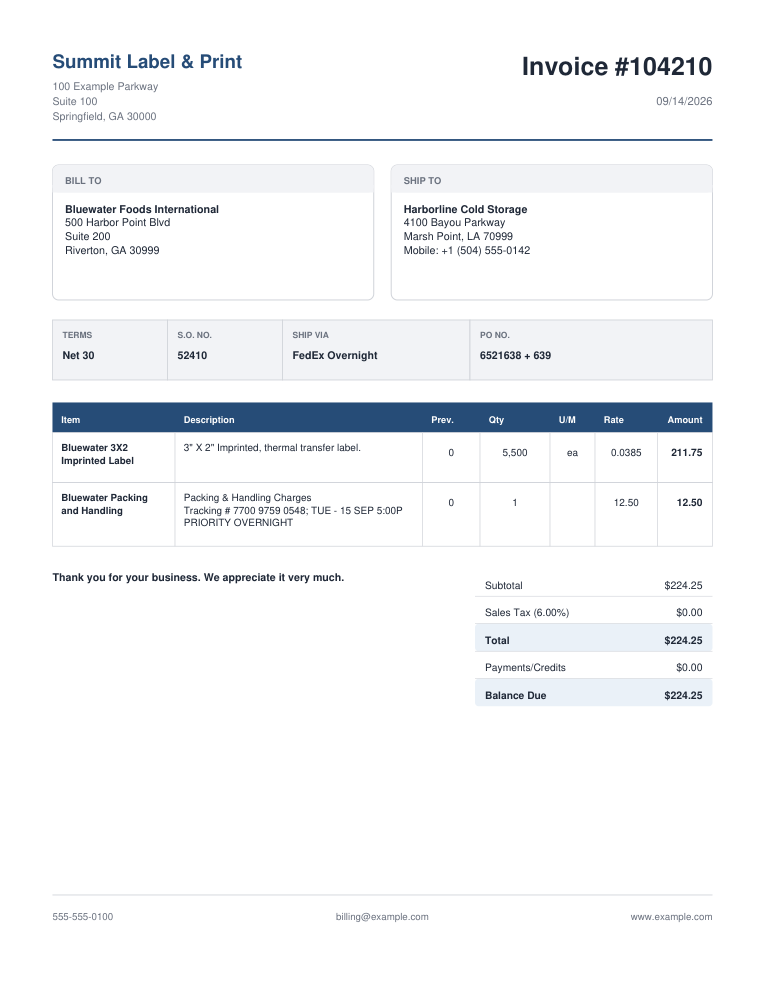
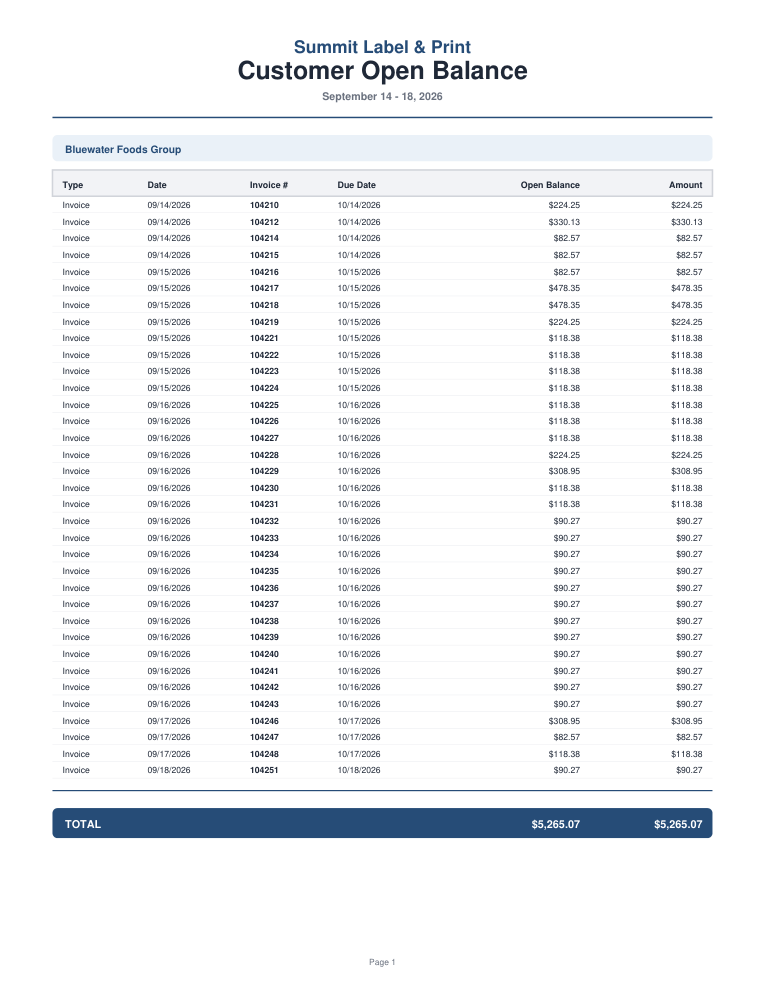
Results
Weekly billing time
BeforeAbout 2 hours
After10–15 minutes
One guided run replaced the clicking, and it added checks the manual process never had. Every invoice is reconciled and validated before a PDF exists, so the reviewer only looks at what the system flags. The run ends with both PDFs and a prepared Outlook draft.
Built with Python and Tkinter. 15 automated regression tests run on every push. Final sending remains human-controlled.
View the Code on GitHubRunnable source with fictional QuickBooks exports, 15 regression tests, and sample PDFs.This demo shows one of the billing rules the automation checks before report generation.
Three invoices are ready for validation. Packing & handling is a flat $12.50 per invoice. Which one should stop the run?
Each card shows a few details from one invoice.
Pick one.
Job Discovery & Matching System
The Problem
Job searching is mostly filtering. New listings appear constantly, the same role shows up on several boards, old posts stay up for weeks, and plenty of listings miss on location, pay, or job type. Reading all of it by hand takes time, and it takes even longer when you're searching for more than one person.
I wanted a system that could turn that noise into a repeatable pipeline: collect fresh listings, apply a candidate's criteria, remove duplicates and obvious mismatches, score what remains, explain why a role fits, and deliver a smaller shortlist worth actually reviewing.
How It Works
- Pulls listings from selected job sources
- Loads a candidate profile with its own resume, target roles, exclusions, and location rules
- Filters by recency, role fit, location, and candidate-specific requirements
- Removes duplicate listings before delivery
- Scores promising matches and explains the strongest reasons they fit
- Sends the shortlist through Telegram
Example Output
STRONG MATCH · 86%
Instructional Designer
Willowbrook Learning Studio
📍 Remote, US
💰 $72,000-$82,000/yr
Why it fits
- direct title match: instructional designer
- training content development
- e-learning and curriculum work
- remote
- full-time
- pay matches target range
Source: SampleJobs10:24 AM
Built for Different Candidates
Each candidate gets their own profile with target roles, exclusions, pay expectations, location rules, and how recent a listing has to be. Collection, filtering, deduplication, scoring, and delivery are shared, so adding another person means writing a new profile, not building another bot.
Personal project, actively developing the matching logic and delivery workflow.
Pick a candidate, then run the search.
Each profile has its own target roles and rules. The same nine listings come in every time, and the results change with the profile.
0scanned
0matched
0rejected
0skipped
- Instructional Designer Waiting
- Business Automation Specialist Waiting
- Customer Service Representative Waiting
- Learning Experience Designer Waiting
- Workflow Automation Developer Waiting
- Training Coordinator Waiting
- Process Automation Analyst Waiting
- Customer Support Specialist Waiting
- Instructional Designer Waiting
AlignedFX

AlignedFX grew out of my own experience as a trader.
I spent a long time focused on strategy, setups, and execution, then realized that knowing what to do was only part of the problem. Mindset, discipline, fear, hesitation, overthinking, and the way money feels emotionally can all affect whether a trader follows a good plan in the first place.
I started building AlignedFX around that gap. It combines trading psychology, money mindset, personalized assessments, calculators, guided meditations, trader study music, and game-like learning experiences designed to help traders understand and work with the mental side of performance.
Building AlignedFX has challenged me to translate abstract concepts like patience, discipline, and positive self-talk into interactive tools, game mechanics, and personalized feedback. Through that process, I’ve learned to break complex ideas into functional systems, design meaningful user interactions, anticipate different outcomes, and refine features through testing and iteration. It’s brought together my background in game design, my interest in psychology, and my passion for building practical, engaging software.
Self Sabotage Slayer
Enter the Arena
Self Sabotage Slayer is a turn-based browser RPG I built to turn trading psychology into a playable challenge. Across 11 bosses inspired by real trading habits, players protect their Mental Equity by choosing when to execute, reset, wait, or take a risk.
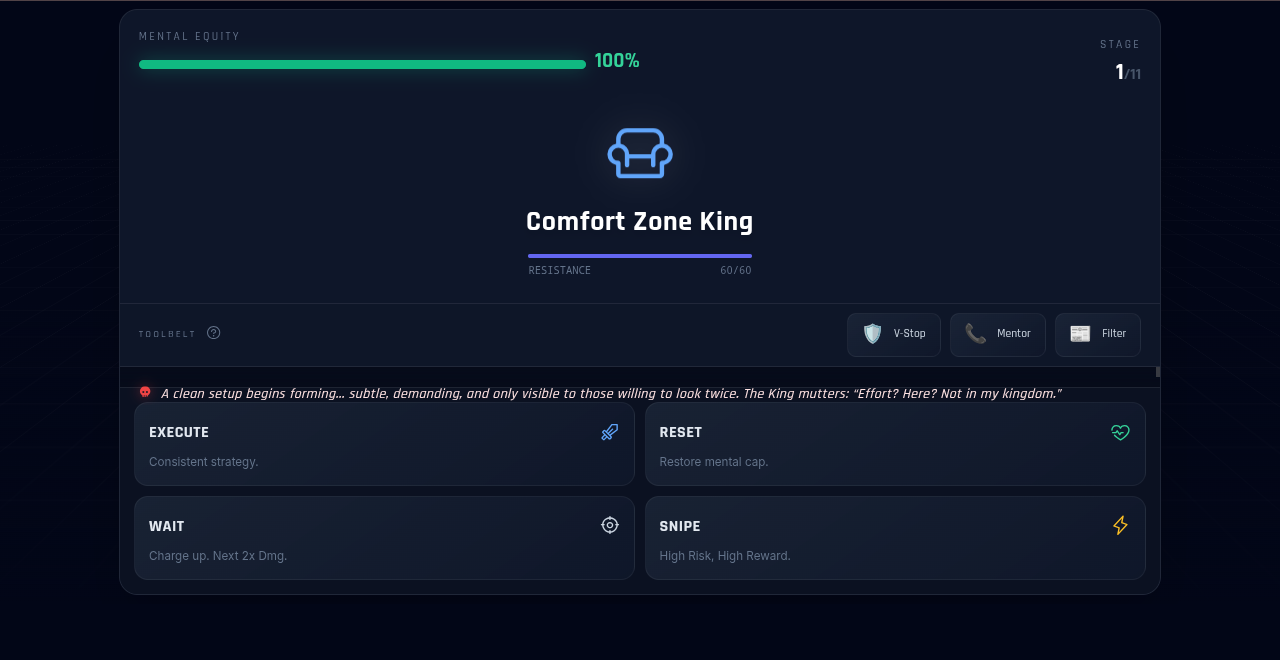
Meet the 11 Bosses From the Comfort Zone King to the Account Assassin
The bosses follow a trader’s journey, beginning with habits like avoidance and hesitation and progressing toward challenges like greed and overconfidence that can affect even experienced traders.
- Comfort Zone Kingwhere it starts
- Paralysis Golem
- FOMO Phantom
- Doomscroll Demon
- Revenge Raptor
- Heartbreak Hedger
- Clarity Crusher
- Volatility Viper
- Greed Goblin
- Pride Pharaoh
- Account Assassinfinal boss
How It Plays
Execute
A reliable attack. Stick to the plan.
Reset
Restores Mental Equity, then needs a turn to recover. Step away before you tilt.
Wait
Hold for a turn and your next hit does double damage. Patience pays.
Snipe
A risky shot that can land big or miss completely.
Mental Equity is your health, and the market changes as you progress: bullish, choppy, bearish, and finally a flash crash. Each phase changes the rules of combat, so you'll need to manage your tools, upgrades, and timing carefully to survive all 11 stages.
Why I Built It
Trading has taught me how easy it is to know the right decision and still struggle to make it under pressure. I wanted to explore those emotional patterns through a game built around choices, consequences, and a little humor. Self Sabotage Slayer brought my background in game design and my interest in trading psychology together, giving me the opportunity to build a complete browser RPG. I also wanted to learn how to take a project from development to a live game, so I used Replit to get hands-on experience with deployment.
What I Built
- Game state that tracks Mental Equity, cooldowns, tools, and upgrades as the player moves through 11 stages
- Boss data for each stage: attacks, damage, battle-log lines, and defeat text
- Market phase modifiers that feed into the combat math
- Sound effects generated in code with the Web Audio API
- A responsive layout with fullscreen mode, and a victory sequence for the final boss
Testing & Iteration
Early playtests showed that the rules needed to be clearer and the game was too punishing. I added a How to Play screen, tips during the first fights, and a toolbelt. When those changes made the game too easy, I rebalanced the combat based on how people actually played.
- Raised player health from 100 to 150 and adjusted boss damage across the 11 stages.
- Gave Reset a recovery turn so players can't heal on every turn.
- Tuned how Reset healing and Execute damage scale as players level up.
Tech Stack
HTML, CSS, vanilla JavaScript, Tailwind CSS, Phosphor Icons, and the Web Audio API.
View the Code on GitHubThe full game source, with notes on how it's built.VR Thriller
Watch the Experience
VR Thriller is a 360° virtual reality experience I created for my virtual production pipeline course at Georgia State University. Inspired by Michael Jackson’s Thriller, it places viewers inside a graveyard surrounded by dancing zombies.
 Watch in the YouTube app
How I Built It
- Designed the zombie cast in Character Creator.
- Cleaned up dance motion files and applied them to the characters using iClone and 3DXchange.
- Captured a friend’s performance in a motion-capture suit for the zombie dancing on the tombstone.
- Built the graveyard environment using SketchUp and Blender 2.8.
- Rendered the finished scene as a 360° video for desktop, mobile, and VR headsets.
A tribute to Michael Jackson’s Thriller. Music and choreography belong to their original owners.
View on ArtStationStills and notes from the project.about me

Games were one of the first places I learned to love systems.
They were a way to bond with my family, a place I could disappear into for a while, and eventually something I wanted to learn how to create for other people.
I earned my bachelor's degree with a major in Game Design & Development and explored game systems, interactive design, 3D modeling, and immersive experiences. What kept pulling me in was the structure underneath the experience: logic, states, feedback, player behavior, edge cases, and the way one rule can change everything around it.
Later, I joined a company that provides labeling, coding, and packaging solutions in a technical and administrative role, which put me close to the daily order, billing, and website work. I kept noticing repetitive processes that could work better, so I started building tools for them.
One automation turned into another, and I realized I liked the same part of this work that I had always liked in games: understanding the system, figuring out how people move through it, finding where it breaks down, and building a better experience on the other side.
I still bring the creative side with me. I enjoy gamifying ideas, creating interfaces with personality, and thinking about how technology can feel more intuitive, immersive, and engaging instead of purely functional.
What ties it all together:
I like building things people actually interact with. Sometimes that is a game, sometimes it is a website, and sometimes it is a Python tool that saves someone from doing the same tedious task every Wednesday.
I build from the process outward. Before I automate anything, I want to understand the real workflow, the unwritten rules, the exceptions, and where a person still needs control.
OBSERVE→MAP→BUILD→BREAK→REVIEW→IMPROVE
Understand the Real Workflow
I start with what people are actually doing, not what the process is supposed to look like on paper. I trace where the information comes from, what gets copied or checked, which rules decide the next step, and where the frustrating parts usually happen.
Turn Business Rules Into System Behavior
A lot of automation work is taking rules people already know and making them explicit. What counts as valid? What should be skipped? What should trigger a warning? What should stop the entire run?
Try to Break It Before Someone Else Does
I do not treat a successful happy-path test as finished. I look for strange inputs, missing information, duplicates, formatting changes, unexpected values, and assumptions that could quietly produce the wrong result.
Keep People in Control
I automate the repetitive work and surface the decisions that still need judgment. Customer-facing output, unusual requests, and anything the system cannot confidently classify should stay visible to the person using the tool.
Use AI as a Development Tool
I use AI tools to explore approaches, troubleshoot, compare solutions, and iterate faster. I still decide how the workflow should behave, verify the logic against the real process, test the edge cases, and own the final result.
skills
Automation & AI
Data & Integrations
Process & Documentation
Web & Marketing
Game, 3D & Creative
Tools & Platforms
contact
Say Hi
Looking for an automation developer, want to talk about the portfolio, or just want to connect? Shoot me a message.
bug_bash.exe
Bug Bash
Release day is here, and the code is crawling with bugs!
Squash bugs+10 each. Keep a streak going to build a combo.
Protect working codeHit it by mistake and you lose 15.
Wave 1: Testing
0:20
0 points
×1 combo
0squashed
0false alarms
0escaped
Shipped to Production!
New best score!
0bugs squashed
0false alarms
0escaped
0 points, best streak of 0
Recycle Bin
trophies
Nice Try
Try to empty the recycle bin
Good Auditor
One invoice fails the vibe check.
Full Tour
Check out my automations!
Poke Around
Pip looks suspiciously tappable.
Say Hi
The contact form is feeling ignored.
credits
All five unlocked. You found the whole OS.
Designed & built by Shaynah
A portfolio OS powered by curiosity, persistence, and an unreasonable amount of tiny UI adjustments.
TROPHIES UNLOCKED (5/5)
Nice Try
Good Auditor
Full Tour
Poke Around
Say Hi